LIFT4 MANUAL
⚠️IMPORTANT: Fully read this manual before using the product. The Lift Foils App connects to your LIFT4 board and hand controller to keep their firmware up to date.
⚠️IMPORTANT: Fully read this manual before using the product. The Lift Foils App connects to your LIFT4 board and hand controller to keep their firmware up to date.
TABLE OF CONTENTS
eFOIL OVERVIEW
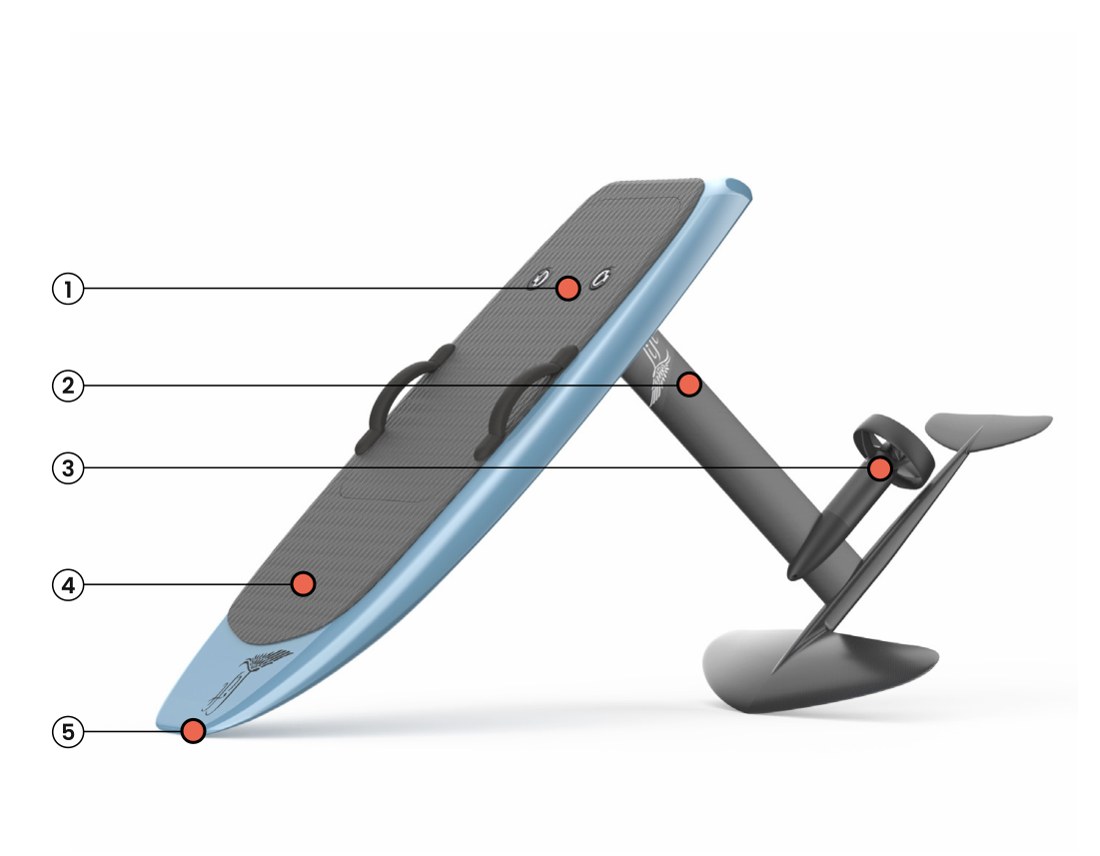
- Hatch Compartment
- Mast
- Propeller
- Board
- Bluetooth Antenna
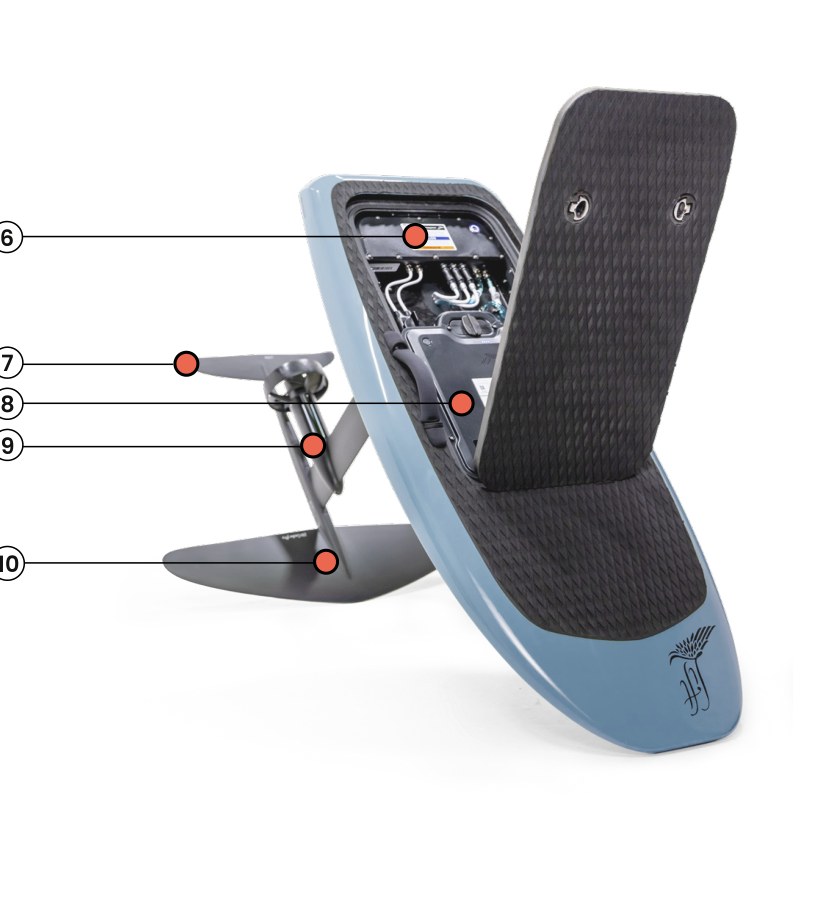
- eBox
- Back Wing
- Battery
- Motor
- Front Wing
SAFETY WARNINGS & DISCLAIMERS
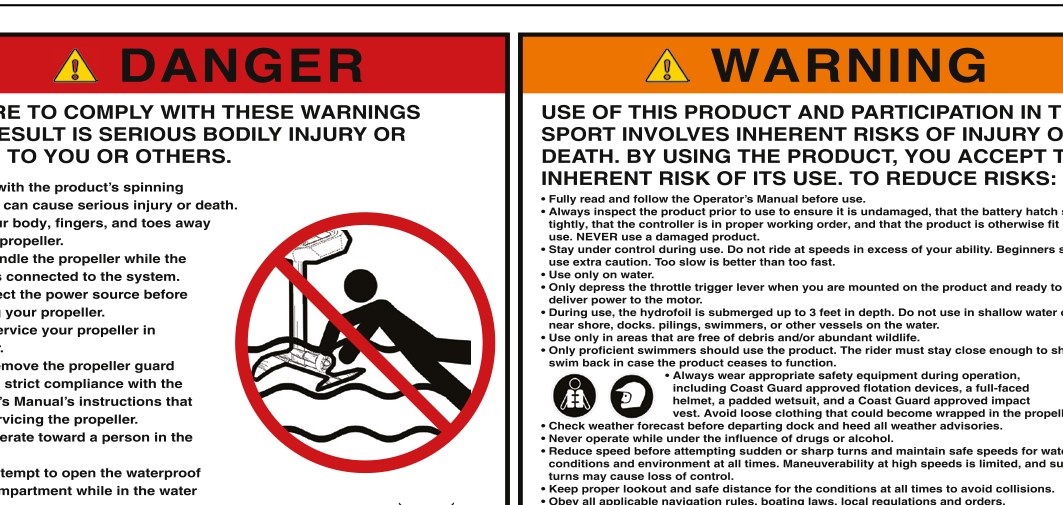
USE OF THIS PRODUCT AND PARTICIPATION IN THE SPORT INVOLVES INHERENT RISKS OF INJURY OR DEATH. BY USING THE PRODUCT, THE USER ACKNOWLEDGES AND ACCEPTS THE INHERENT RISKS OF ITS USE. FULLY READ THIS MANUAL BEFORE USING THE PRODUCT.
The information contained in this User Manual represents the most up-to-date product data available at the time of release. Lift Foils is committed to continuous product improvements and advancement of technology and the company reserves the right to change the product, components, specifications, or other aspects of the Lift board without advance notice.
The most current information can be found on the Lift Foils website: www.liftfoils.com
WARRANTY
The Lift eFoil is subject to a two-year manufacturer’s limited warranty; for the product’s battery, the earlier of two years or 600 battery cycles. The manufacturer’s limited warranty covers any defects in materials or workmanship under normal use during the warranty period. For full details, please refer to the Warranty Page of the Lift Foils website.
GENERAL WARNINGS
RIDE SAFETY
TO REDUCE RISKS:
- Always inspect the product prior to use to ensure it is undamaged, that the battery hatch seals tightly, that the controller is in proper working order, and that the product is otherwise fit for use. NEVER USE A DAMAGED PRODUCT.
- Do not allow others to operate the craft without making them fully aware of the proper procedures and risks of the craft.
- ⚠️NOT FOR USE BY CHILDREN. This product is a powerful water device and should not be operated by anyone under the age of 16.
PROPULSION SYSTEM
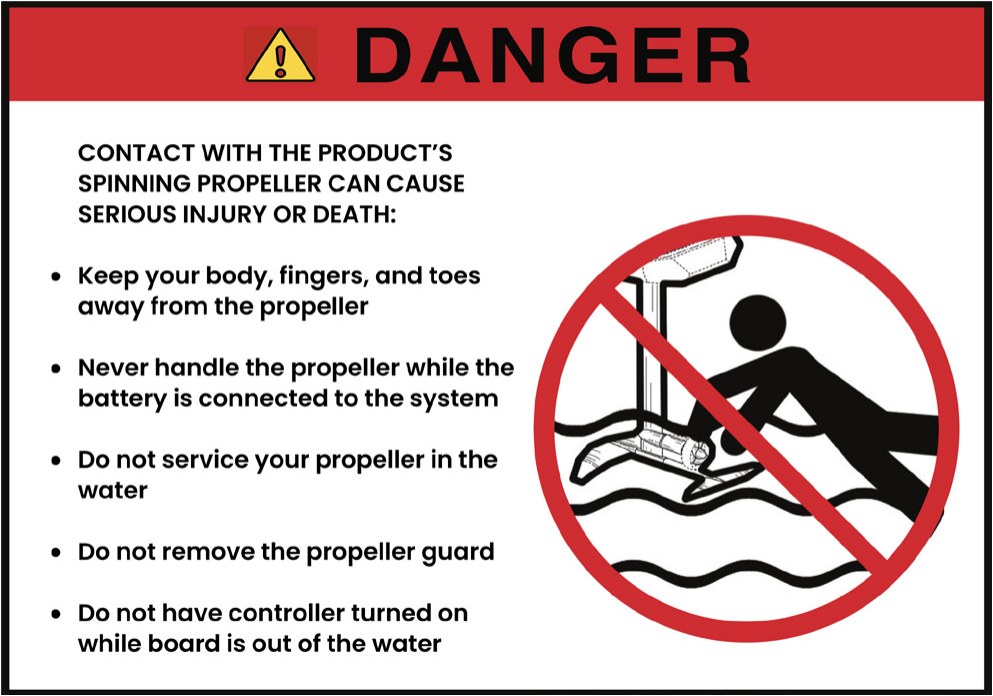
- ⚠️ALWAYS KEEP THE REMOTE OFF WHEN THE BATTERY IS INSTALLED AND ACTIVE, UNTIL READY TO USE.
- ⚠️CONTACT WITH THE PRODUCT’S SPINNING PROPELLER WILL CAUSE SERIOUS INJURY OR DEATH.
- ⚠️KEEP BODY, FINGERS, AND TOES COMPLETELY AWAY FROM THE PROPELLER.
- ⚠️NEVER HANDLE THE PROPELLER WHILE THE BATTERY IS CONNECTED TO THE LIFT eFOIL. Disconnect the power source before servicing the propeller. Do not service the propeller in the water.
- ⚠️NEVER OPERATE TOWARD A PERSON IN THE WATER!
BATTERY
⚠️DO NOT ATTEMPT TO OPEN THE WATERPROOF HATCH COMPARTMENT WHILE IN THE WATER FOR ANY REASON.
- DO NOT disassemble or attempt to modify or service. No serviceable parts inside.
- DO NOT use for any purpose other than that intended.
- DO NOT mishandle, drop, or damage in any way.
- DO NOT puncture the battery.
- DO NOT expose the battery to fire or elevated temperatures above 60°C.
- Inspect the battery before every use. If damaged, do not use. Exposure of a damaged pack to water could result in shock, fire, arc flash, serious injury, or death.
- Transport this unit in accordance with all applicable laws.
- DO NOT dispose of this unit. Recycling or disposal of lithium-ion batteries requires specialized facilities.
- Only charge using the unit provided.
- DO NOT leave the battery unattended while charging.
- DO NOT handle the battery and electronics with wet hands.
- DO NOT drop the battery. Do not use the product’s battery if it is damaged. Damage to the battery may result in a fire.
- DO NOT connect the battery or any electronics while in the water. Assemble all items on the shore in a dry environment.
LIFT BATTERY SAFETY
Our advanced lithium-ion battery has been carefully designed, tried, and tested to resist water and adequate eFoil usage. If the battery seal is compromised, the battery might come into contact with water, which may result in internal damage, fire, or explosion. In case of damage, please store your battery in a safe and non-flammable place and contact us right away.
WARNING SIGNS FOR A COMPROMISED BATTERY
- Any visible signs that would indicate the battery’s enclosure has been compromised.
- Cracks, or the seam of the lid not closing down with the rest of the case.
- The battery experienced a significant drop or shock.
- The battery becomes irregularly “hot” to the touch.
- The battery is at a significant level of charge (greater than 40%) and suddenly cuts out during a ride.
- Upon inspection, there are no LEDs on the battery, and it is unresponsive.
SAFE BATTERY USAGE
- Use the battery at your own risk.
- Do not open the hatch compartment under any circumstance when in the water or with wet hands. ALWAYS KEEP THE BATTERY DRY.
- Never use a damaged battery, a battery that has a compromised seal, or a battery that has experienced a significant drop or shock.
- Inspect the battery before each use.
- Do not charge your battery unattended.
- In case of visible damage to the battery seal or water ingress into the battery, move the battery to a large, open, non-flammable area or completely submerge the battery in a tank of water, and contact Lift immediately for assistance.
- DO NOT operate the battery in temperatures lower than 0°C or higher than 55°C.
- DO NOT drop the battery or use a battery that has been involved in a crash.
- DO NOT place heavy objects on the battery or charger.
- DO NOT walk or stand on your battery.
- DO NOT use a battery other than the lithium-ion Lift Foils battery. Damage resulting from a non-Lift Foils battery will not be covered under the warranty.
- DO NOT disassemble the battery.
- KEEP THE BATTERY AWAY from heat sources, microwaves, freezers, or pressurized containers.
- IN CASE OF FIRE, extinguish with cold water without additives, or dry powder in large amounts.
- DO NOT dispose of batteries in regular trash containers. Follow local regulations for the disposal and recycling of batteries.
GETTING TO KNOW THE LIFT eFOIL
A video containing a full breakdown of unboxing, setting up, and maintaining your eFoil can be found on our YouTube channel, titled LIFT3 eFoil Unboxing and Setup.
HOW THE LIFT eFOIL ARRIVES
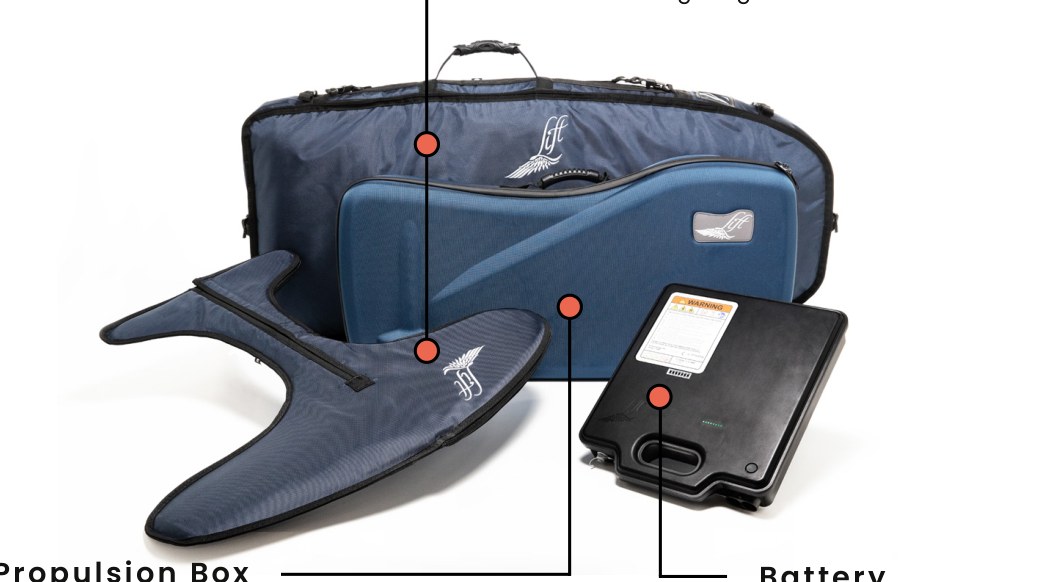
The components for the Lift eFoil arrive in three separate boxes:
- Board & Wing Box: Board, Board Bag, Wing, and Wing Bag
- Propulsion Box: Propulsion Unit (Mast, Motor, and Propeller), Propulsion Case, Battery Charger, Charger AC Cable, Hand Controller, Tool Kit, LIFT Sticker
- Battery
IN THE TOOLKIT
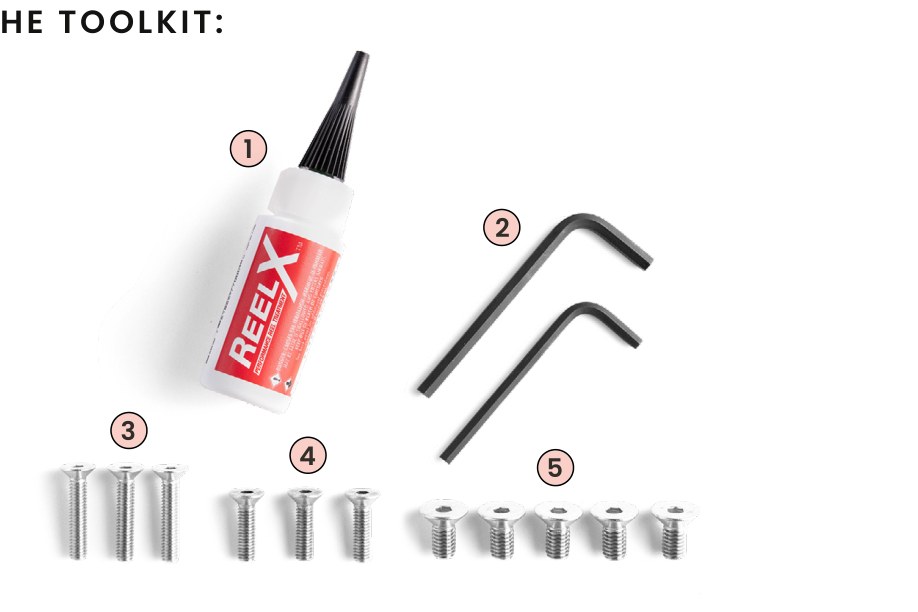
- One-ounce bottle of ReelX: anti-corrosion oil to be used periodically on your data connectors, phase pins, and inside of the battery cam-lock.
- Hex keys, qty 2: 4mm (for M6 screws) and 5mm (for M8 screws).
- M6x30mm screws, qty 3: used to connect the front wing to the mast. One spare screw is provided.
- M6x22mm screws, qty 3: used to connect the back wing to the front wing. One spare screw is provided.
- M8x16mm screws, qty 5: used to connect the mast to the board. One spare screw is provided.
1. BOARD
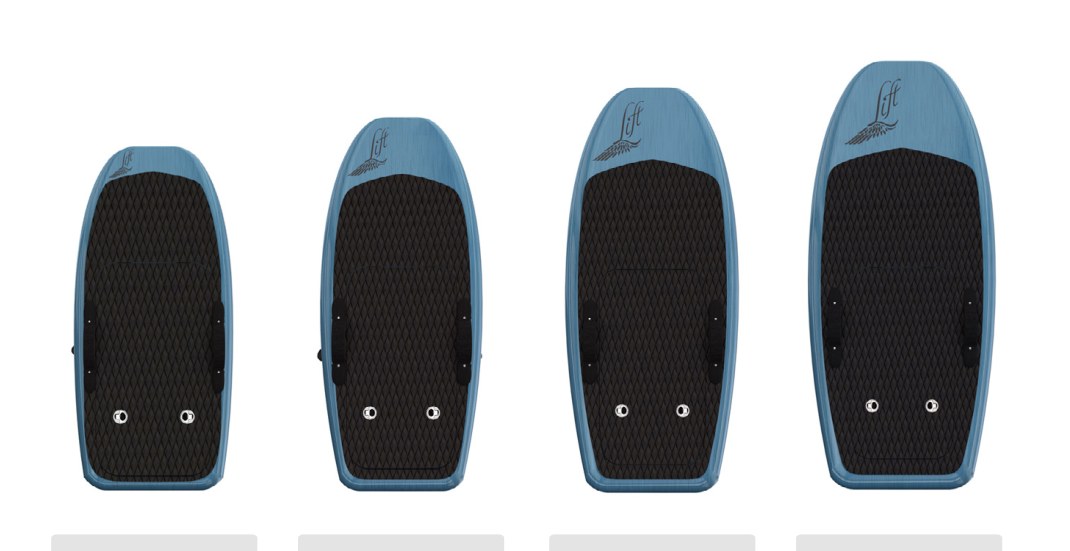
The board comes in four sizes: 4’2’’ Pro, 4’9’’ Sport, 5’4’’ Cruiser, and 5’9’’ Explorer.
SERIAL NUMBERS
- The Hull Identification Number (HIN) of your eFoil is located on the starboard side of the board near the tail. Verify the documentation provided with the eFoil matches the board’s HIN.
- The serial number of the eBox is located under the white phase connectors.
- The battery serial number is located on the battery’s label.
- A white manila envelope containing all of the paperwork to register your board is included with your eFoil.
Disclaimer: As your Lift eFoil is a powered VESSEL, we recommend all boards be registered properly according to your local rules and regulations.
2. HATCH COMPARTMENT
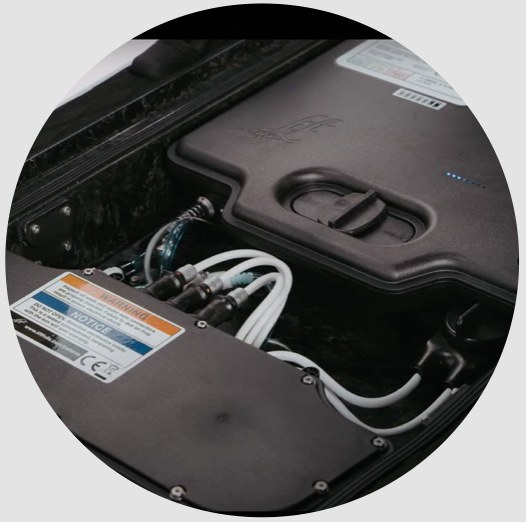
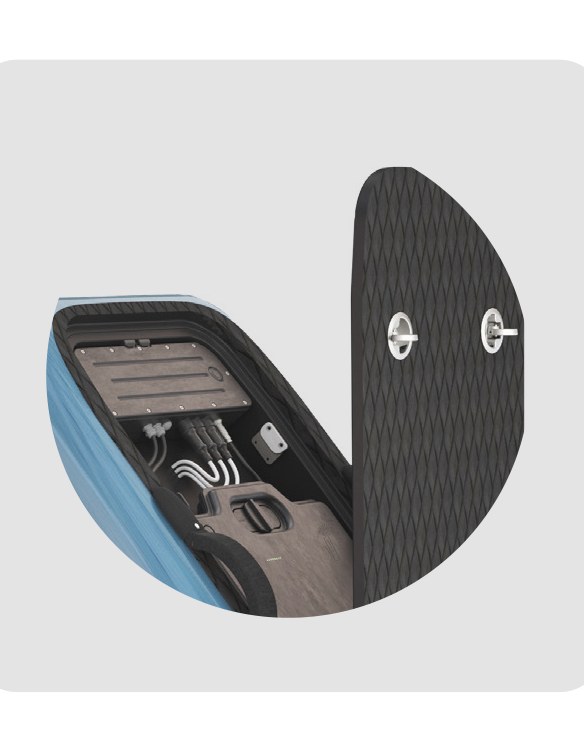
The hatch compartment is found on the top of your board and can be accessed by opening its two latches found on the deck pad. The components of the hatch compartment include:
- eBox
- Battery
- Battery Lock
- Bluetooth Antenna
- Data Cables
⚠️DO NOT open your hatch compartment over 90 degrees.
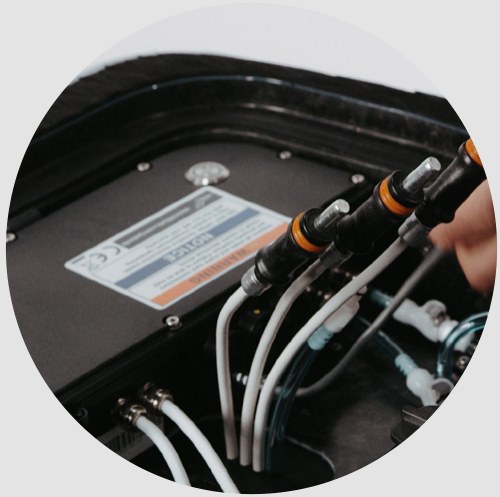
3. eBOX
The eBox comes installed in the hatch compartment of your board. The eBox components you need to be familiar with are:
- Power button
- Two blue water tubes (input and output)
- Three phase connector ports, each with a colored dot (one red, one yellow, and one green)
- Pairing/firmware relay switch
4. BATTERY
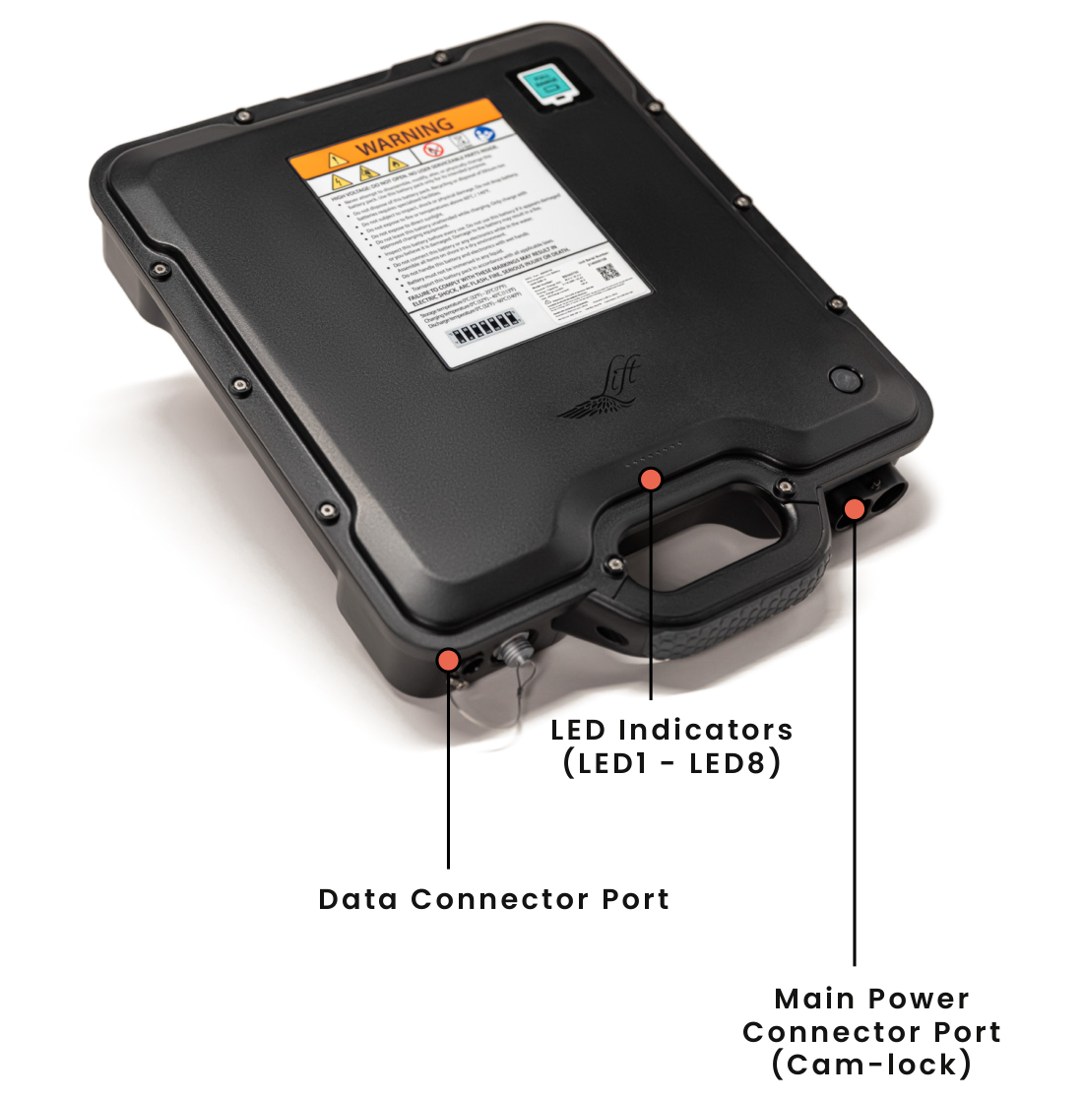
The components on the battery include:
- LED Indicators (LED1 – LED8)
- Data Connector Port
- Main Power Connector Port (Cam-lock)
LED INDICATORS
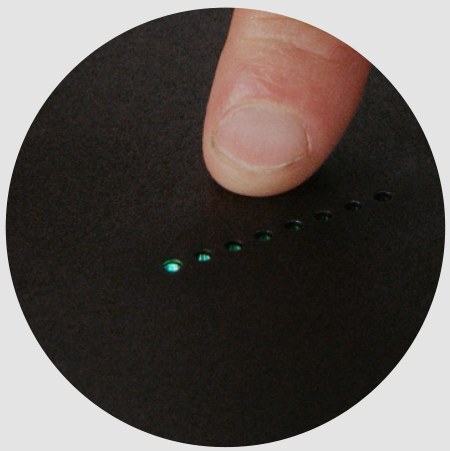
The LEDs will BLINK GREEN when inactive, with the number of LEDs indicating the state of charge:
- All lights = 100% charge
- No lights = less than 10% charge
The LEDs will be SOLID GREEN when charging (with the number of LEDs indicating the state of charge while charging). The LEDs turn BLUE when running system checks and when connected to the eBox.
| Full Range Battery | Light Battery | |
|---|---|---|
| Battery Cell Form Factor | 18650 Cylindrical | 18650 Cylindrical |
| Cell Count | 196 Cells | 126 Cells |
| Battery Pack Configuration | 14S-14P | 14S-9P |
| Nominal Battery Voltage | 50V | 50V |
| Battery Voltage Range | 35–58V | 35–58V |
| Energy Capacity | 2.1 kWh | 1.4 kWh |
| Battery Pack Weight | 12.5 kg (27.5 lbs.) | 9.3 kg (20.5 lbs.) |
| Ingress Rating | IP68 | IP68 |
| Pack-level Safety | Integrated Contactor, Pack Level Fuse, Integrated BMS | Integrated Contactor, Pack Level Fuse, Integrated BMS |
| Cell-level Safety | Individual Cell Fusible Links, Cell Group Temp. Sensing, Cell Balancing | Individual Cell Fusible Links, Cell Group Temp. Sensing, Cell Balancing |
| Operating Temp. Range | 0 to 55°C* | 0 to 55°C* |
| Recommended Storage Temp. Range | 0°C to 25°C | 0°C to 25°C |
| Maximum Allowable Storage Temp. Range | -30°C to 50°C | -30°C to 50°C |
* If the battery is too warm (above 45°C), it will charge more slowly until it cools down.
5. DATA CONNECTORS
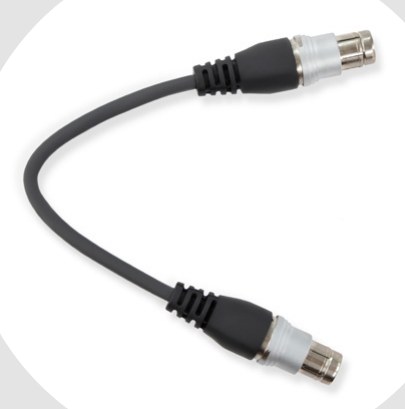
The eFoil utilizes two unique data connectors.
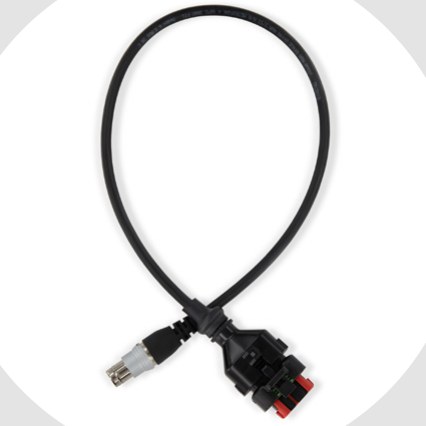
- Data Cable: sends sensitive communication from the battery to the eBox.
- Charger Cable: the charging data cable connects the battery to the charger.
Both cables are easily interchangeable. The cables can be damaged by corrosion if not properly maintained. Use your provided ReelX oil to prevent corrosion.
6. PROPULSION UNIT
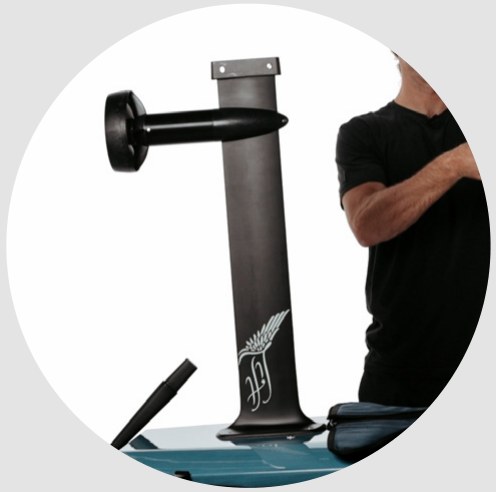
The propulsion unit is comprised of a carbon fiber mast (28’’ or 32’’ in length), the motor, and the propeller. The connectors extending out of the top of the mast are:
- Three phase connectors (one marked red, another yellow, and another green)
- One blue water cooling tube
7. MOTOR
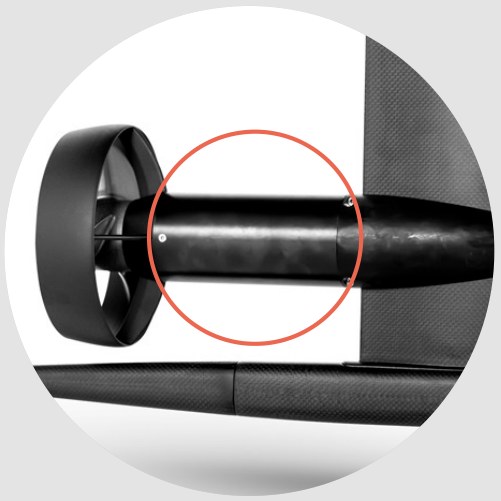
Lift eFoils use a brushless inrunner electric motor. The motor’s maximum power output at the shaft is 3,900 watts.
The motor comes preinstalled onto the mast and is removable for service and/or replacement.
8. WINGS
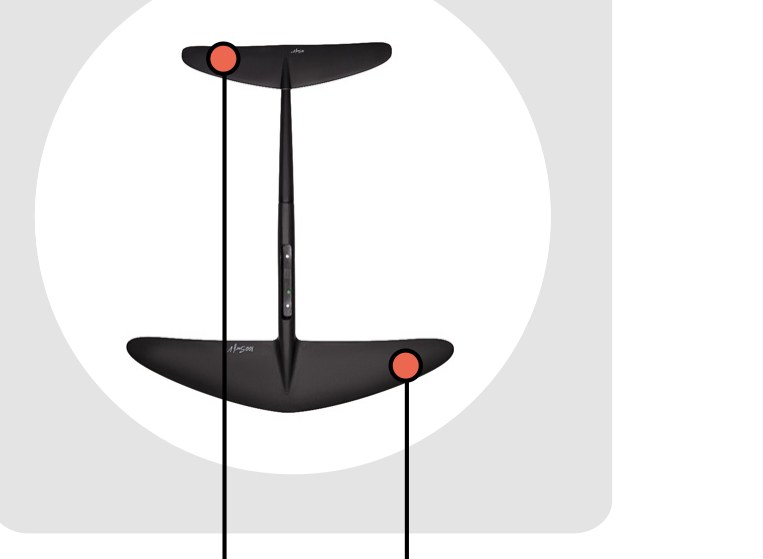
The wings are critical for the stability of the eFoil. The wings attach to the mast, and the shape of each wing changes the eFoil riding experience, offering a wide range of options for effectiveness, stability, and performance, with no unnecessary drag.
Our wings use a two-piece construction, with interchangeable front and back wings for easy transport and multiple configurations.
The wing selection is based on the rider’s weight, riding style, experience level, and riding conditions. You can find Lift’s complete wing lineup on our website: www.liftfoils.com
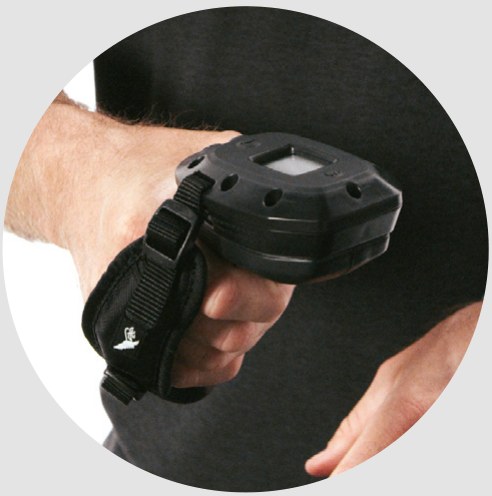
9. HAND CONTROLLER
The hand controller comes with two replaceable AA batteries that will last for 40+ hours of ride time. Use a 2mm hex key to remove the remote’s end cap for battery replacement.
NOTE: Always use brand-new batteries when replacing the batteries of your hand controller.
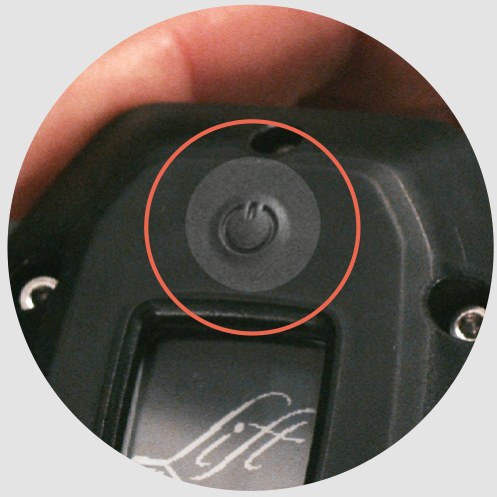
POWER BUTTON
The power button is above the screen. Click to turn the controller ON and OFF.
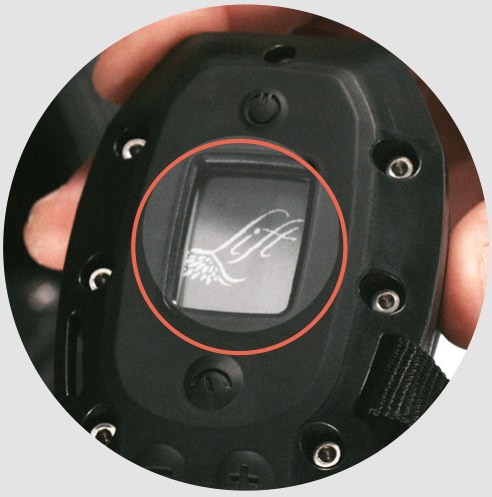
HOME SCREEN
This is the hand controller’s display.
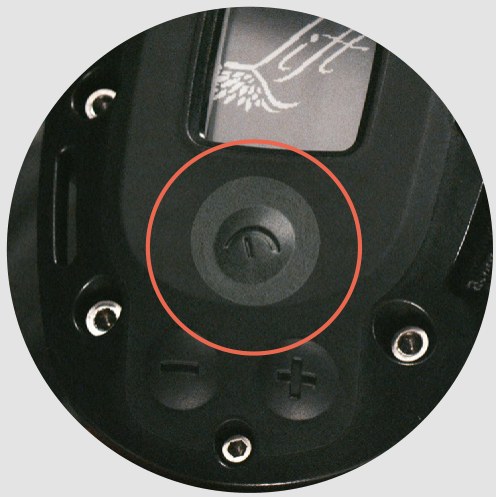
GOVERNOR “SET” BUTTON
The Governor button is found under the screen. Pressing this button will toggle the screen between the remaining battery charge and the speed setting (1–15).
CHARGING THE BATTERY
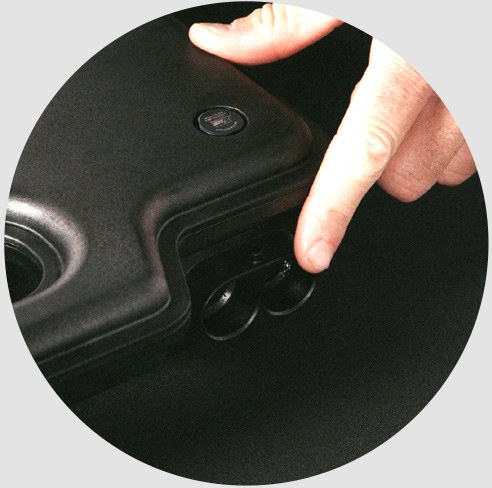
Identify the main power connector port on the battery.
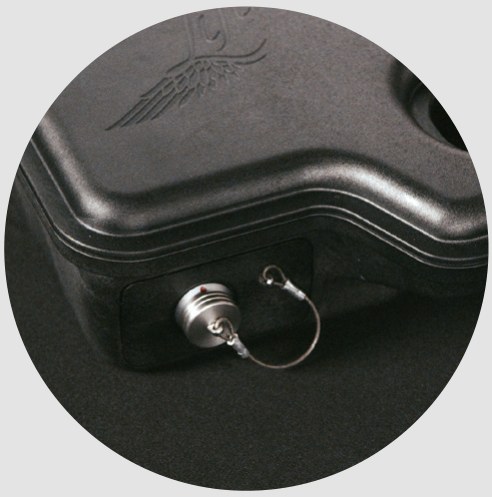
Identify the data connector port and remove its cap.
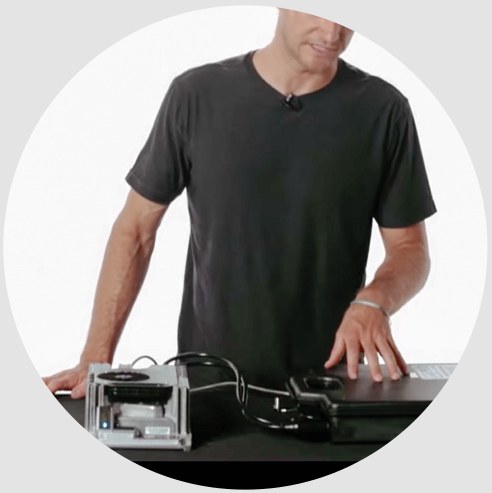
Always lay the battery flat and handle it with care. Arrange the battery and the charger to face each other (male & female) to allow for an easier connection.
BATTERY/CHARGER CONNECTION SEQUENCE
Be sure to follow this connection sequence when connecting the battery to the charger and power source.
- Connect the charging data cable from the charger to the battery.
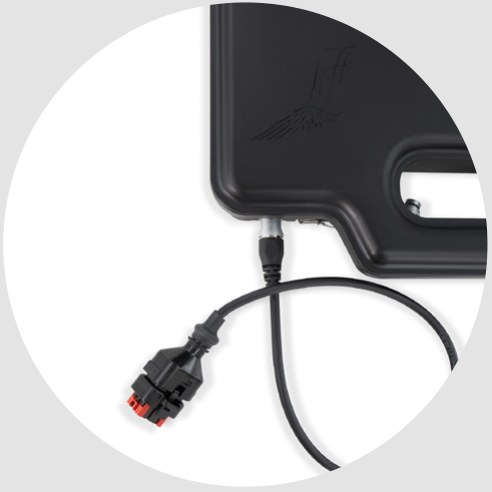
- Connect the cam-lock connector from the charger to the battery. Apply forward pressure into the battery and rotate the cam-lock clockwise.
⚠️CAUTION: Be careful not to force the connection, which can damage the power connector panel of the battery.
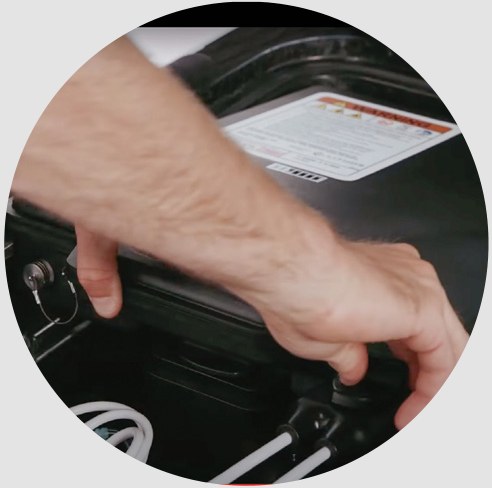
- Plug the battery charger into a wall outlet AFTER both the main power (cam-lock) connector and the charging data cable have been connected.
NOTE: This is a high-energy charger and should not share a power receptacle with other appliances. Make sure that the power source for charging can handle up to 1200 watts.
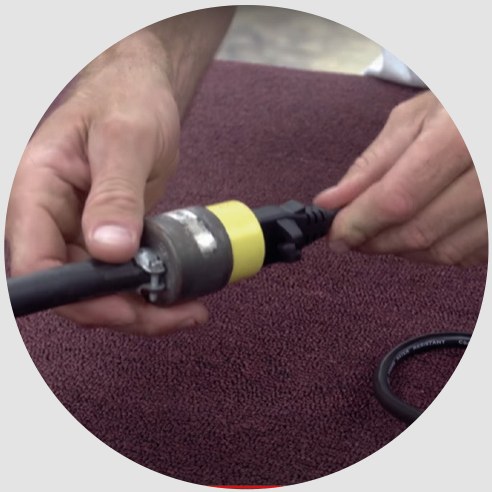
NOTE: Following the correct connection sequence is critical. Connecting or disconnecting plugs or cables in the wrong order may cause arcing and premature wear of your equipment.
⚠️CAUTION: Be very careful with the data pins of the charging cable and ensure that they remain free of damage and corrosion. Take care of your data connectors as necessary to maintain a clean connector. Rinse with fresh water and apply ReelX.
The battery and charger will make an audible clicking noise when the connection has been made.
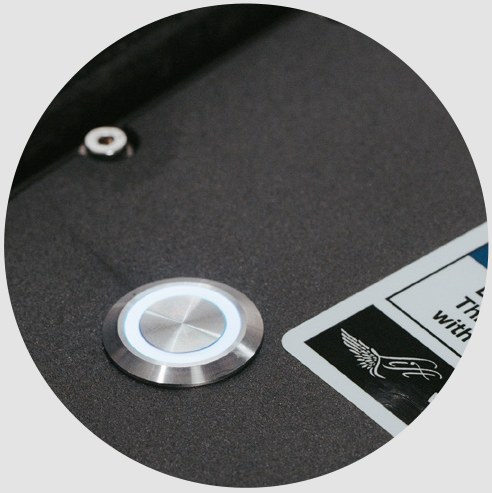
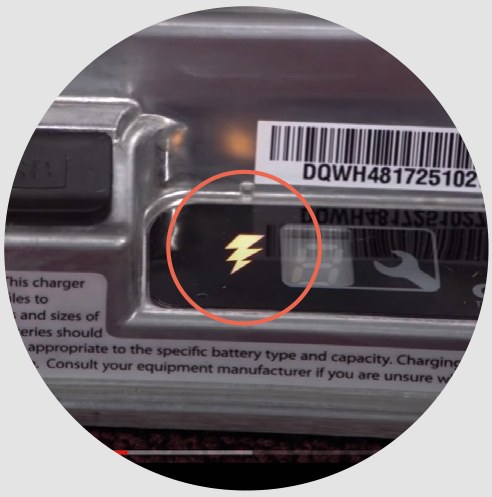
The lightning bolt icon on the charger indicates that charging has started.
The green LEDs on the battery will indicate the charging progress. For example, 4 green LEDs indicate the battery is roughly 50% charged.
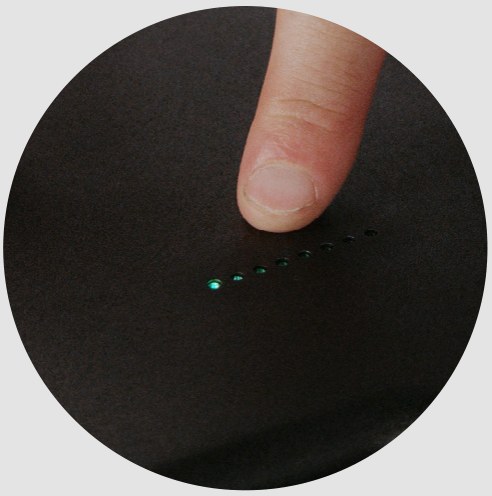
- Charging is recommended in a cool and dry environment.
- Do not cover up the charger while in use. The aluminum heat sinks are designed to allow airflow and cooling of the charger.
- The charger fan will come on automatically if and when necessary. It’s OK if the fan does not turn on while charging.
- The battery is fully charged when the lightning bolt icon (on the charger) turns off, and all 8 LED lights (on the battery) are BLINKING GREEN. Charging should take up to 2 hours.
NOTE: It is not necessary to fully discharge the battery before putting it on charge.
DISCONNECTING THE BATTERY
When charging is complete, all 8 LEDs will BLINK GREEN. Once the battery is fully charged, follow this disconnection sequence:
- First, unplug the charger from the wall outlet.
- Next, disconnect the charging data cable from the battery.
- Finally, disconnect the power connector cam-lock from the battery connector.
To stop charging midway, disconnect the charging data cable and wait for charging to stop. Next, disconnect the charger from the wall, then disconnect the cam-lock connector.
ASSEMBLY
While the battery is charging, find a clean environment to assemble the rest of the eFoil.
INSTALLING THE MAST
- Locate the mast and the board.
The top of the mast has a rubber seal on the surface with three phase connectors and one blue water tube with connector.
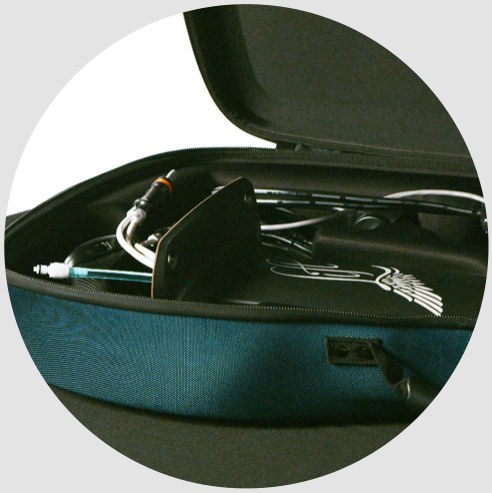
- Locate the four threaded inserts on the bottom of the board. This is where the mast will connect. Steady the mast and feed the cables through the port at the bottom of the board.
PRO TIP: Arrange the cables so there is a nice smooth curve, guiding the tips of the cables toward the front of the board.
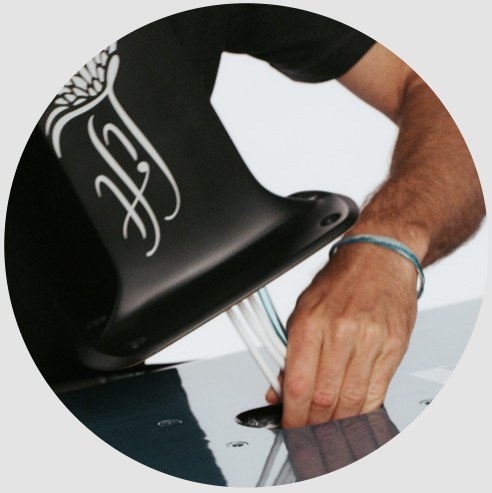
- Use both hands to secure the mast and press down firmly as the rubber seal seats into position.
While holding the mast in place with one hand, find the M8x16mm screws and start threading them in by hand.
Make sure all four M8 screws are threaded by hand before tightening with the 5mm hex key. Continue to hold the mast in place and tighten the screws with the 5mm hex key.
Tighten the M8 screws firmly and cycle through each one at least twice to ensure a secure connection and seal. Be sure that all edges of the mast base are seated firmly against the bottom of the board.
PRO TIP: Use 8–9 newton-meters (Nm), or 6–6.5 foot-pounds, of torque when installing the M8x16mm screws.
INSTALLING THE WINGS
The front and back wings are shipped unattached, so you will first need to attach the front wing to the back wing for a completed wing set-up.
Remove the front wing from the wing bag. Locate the back wing, wrapped separately in the board box. Attach the front wing to the back wing using two M6x22mm screws and the 4mm hex tool.
Install the wing set-up onto the mast using two M6x30mm screws and the 4mm hex tool.
PRO TIP: Use 6–7 Nm, or 4.5–5.0 foot-pounds, of torque when installing the M6x22mm and M6x30mm screws.
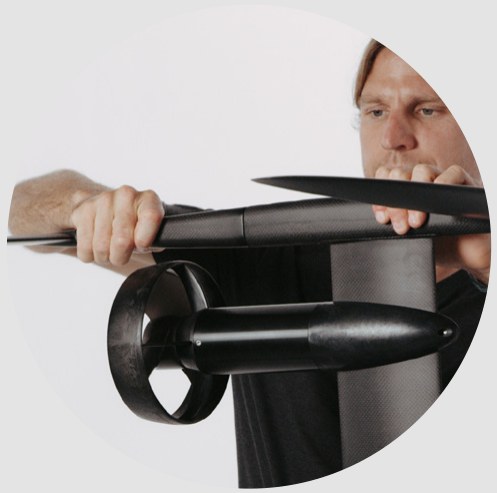
Place the assembled wing set-up into the wing bag for protection while continuing assembly.
Once the mast and the wings are securely installed, flip the board over and open the hatch.
CONNECTING THE ELECTRONICS
- Open the hatch compartment by identifying the two latches on the board pad. Lightly press down on the top of the hatch while lifting the latches and rotating to open. Make sure not to overextend the hatch compartment when opening.
⚠️DO NOT open your hatch compartment over 90 degrees.
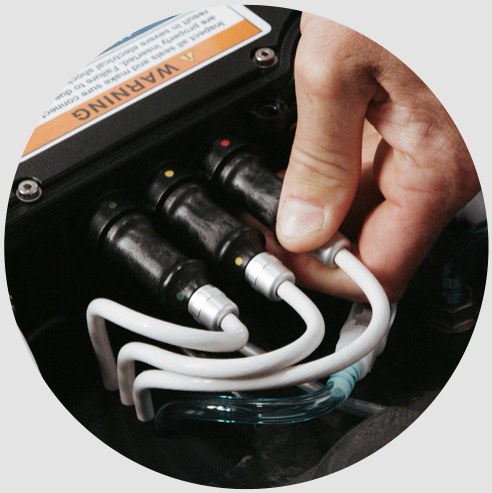
- Connect the three phase connectors to the eBox and both ends of the water cooling tube.
NOTE: There is a distinct feeling and sound when the blue water cables connect. This is critical to keep the eBox running cool. Water will not flow if the connectors are not properly mated.
Insert the phase connectors by matching the colors (red, yellow, and green) and pressing firmly.
NOTE: Plug the red, green, and yellow phase connectors into the corresponding connection points. If a cable is put in the wrong port, the propeller will spin in reverse but will not damage the motor.
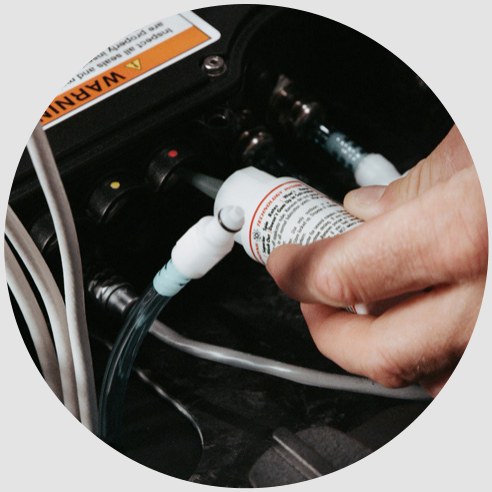
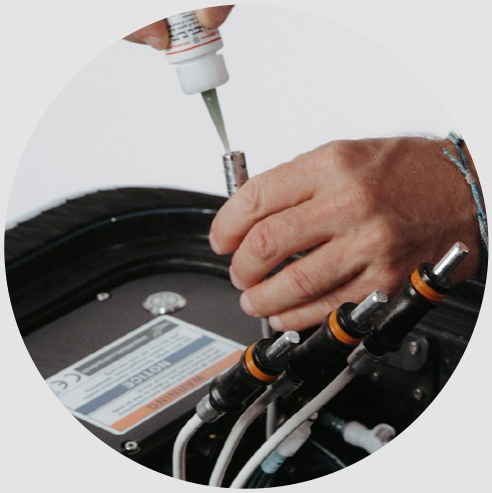
- Apply a drop of ReelX to the phase connector electrical contacts and data plug.
The connection points are double-sealed for water protection, so there might be slight resistance, which guarantees a waterproof seal. Ensure that the orange o-ring is fully inserted.
⚠️CAUTION: If the phase connectors are not fully seated into the eBox and water enters the hatch compartment, it may result in an electrical shock.
GETTING READY TO RIDE
INSTALLING THE BATTERY
- Open the hatch compartment in a clean area free from water or sand and place the fully charged battery inside with the stickers facing up.
- Secure the battery using the battery cam-lock.
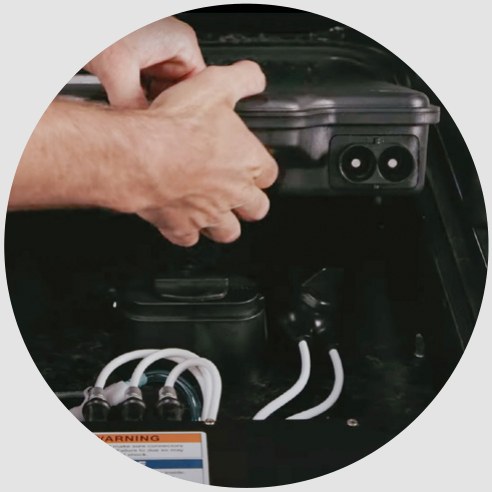
- Make sure the eBox is turned off by viewing the power button on the left-hand side of the eBox. The power button will be a solid blue ring when ON and colorless when OFF.
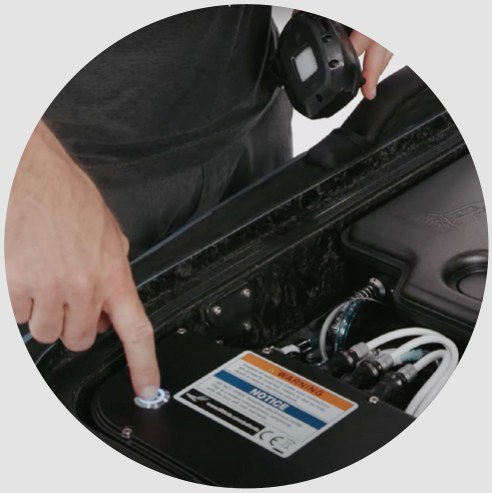
- Connect the power connector to the battery by sliding the cam-lock slip over the pin; apply forward pressure and twist the cam-lock connector 90 degrees to engage.
⚠️CAUTION: Do not force the cam-lock onto the battery connector panel, because this can damage the battery connector panel.
NOTE: Apply a drop of ReelX to the contacts inside the power connector and data cable once a month. Check your data cable’s plug and battery receptacle for signs of corrosion. Clean it with an electrical contact cleaner spray if needed and, once dry, apply a drop of ReelX.
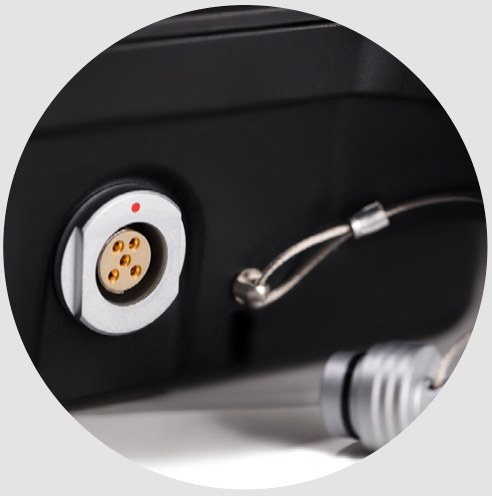
- Remove the protective cover from the data port on the battery and carefully plug in the data cable. Make sure to feel and hear the data connector “click” into place. The data connector is keyed, so it will only connect when the red dots are lined up.
⚠️CAUTION: This data cable uses sensitive electrical contacts to relay critical information to the eBox. It is important to keep this connector and its pins clean and free of debris and salt water. TAKE CARE OF THE DATA CONNECTOR!
BOOTING UP THE SYSTEM
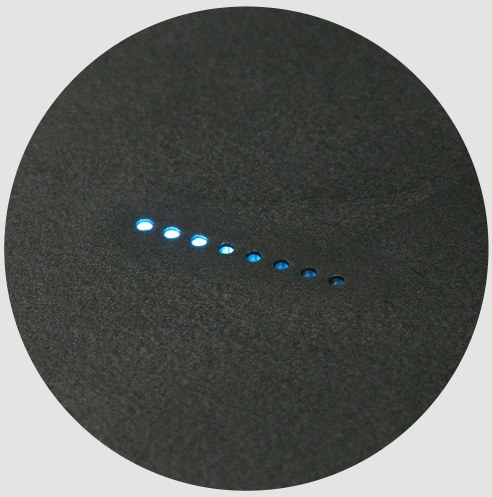
- Press the power button on the eBox to boot up the system. The power button will flash blue as it goes through its system check. It will turn solid blue when the startup is complete. The battery light bar will also show four blue LEDs, indicating that the connection to the system is successful.
- There will be an audible “click” inside the battery as the battery turns on. This is the internal battery contact closing the circuit and applying voltage to the system.
- After a few seconds, there will be a chime from the motor confirming the startup sequence of the motor.
NOTE: The startup procedure can take up to 10 seconds for a comprehensive system check. Lights on the battery will turn from green to blue as it enters “startup” mode.
NOTE: It is important to become familiar with this startup sequence, as it is how you’ll know the Lift eFoil is ready to ride.
- Power on the hand controller by pressing the power button above the screen. The Lift logo will appear, followed by a battery icon on the hand controller’s screen. This confirms that the hand controller and board are properly paired.
- Once pairing has been confirmed, make sure the propeller is free and clear, and give the controller a small amount of throttle to spin the propeller.
- Once the propeller is confirmed to be spinning counterclockwise, press the power button on the hand controller to turn it off.
- Finally, inspect the hatch compartment seals to ensure they are free from damage and debris. Carefully close the lid and fasten the latches.
- Ensure the hatch compartment is sealed. You should not find large quantities of water in the hatch compartment after a ride.
NOTE: If the hand controller screen indicates “no signal,” the board and hand controller are disconnected. See Pairing the Controller below.
NOTE: The propeller should rotate counterclockwise when facing the front of the board. If it does not, check the phase connector plugs to make sure the colors match.
⚠️CAUTION: DO NOT transport the board with the hand controller turned on. Always turn off the hand controller in any instance when you’re NOT riding the eFoil.
⚠️CAUTION: DO NOT run the motor out of the water except for a brief check to ensure it is working correctly.
PAIRING THE CONTROLLER
PAIRING THE HAND CONTROLLER VIA BLUETOOTH
If the screen on the hand controller is indicating “no signal,” the hand controller is not paired with the board or the board is turned off. To pair the hand controller:
- Confirm the eBox is turned on.
- Confirm the hand controller is turned off.
- Press and hold the (–) and (+) buttons, and then press the power button on the hand controller.
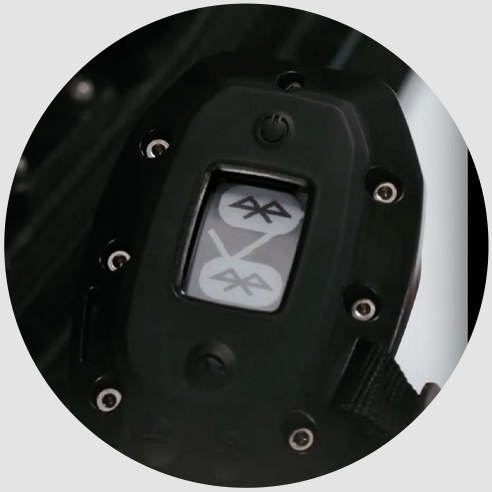
- The hand controller screen will show a Bluetooth logo, indicating that it is in pairing mode. If this screen does not appear, turn off the hand controller and repeat the above process to enter pairing mode.
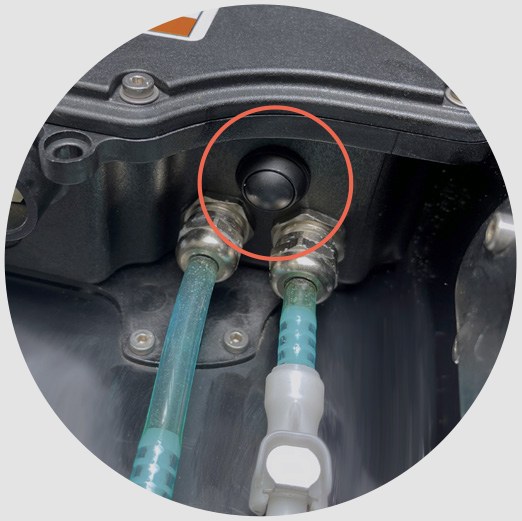
- After the controller is in pairing mode, press and hold the black relay button on the eBox (located near the blue water tubing) for up to 5 seconds. The blue startup button will flash and the hand controller will display a check mark, indicating the hand controller is now paired to the eFoil.
CONTROLLER HOME SCREEN
- The hand controller’s home screen displays the battery level of the main battery inside the board, indicating how much ride time is remaining.
⚠️CAUTION: The Lift eFoil will automatically reduce power and enter a “limp mode” when there is only 10% battery left. This indicates you need to return to shore and recharge the battery.
Watch the screen for low battery and other warnings. Your hand controller will alert you if it is low on battery or if your electronic components are getting irregularly hot.
GOVERNOR MODE
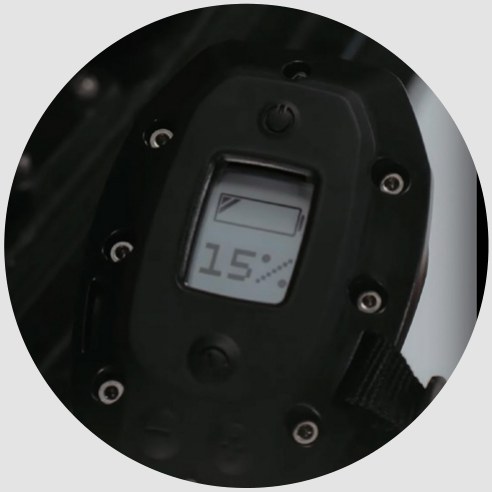
- Governor mode limits the maximum throttle output, which allows riding at reduced speeds.
- Press the (+) or (–) button to increase or decrease your power level, from 15 total settings.
- To set your power level, make sure the hand controller is powered on and then press the “set” button just below the screen. Press “set” again to lock in the governor setting. Your power level will be displayed on this screen.
RIDING THE eFOIL
PLEASE WATCH OUR INSTRUCTIONAL VIDEOS TO LEARN HOW TO RIDE. Find them on our YouTube channel: www.youtube.com/liftfoils
REMEMBER: ALWAYS RIDE SAFELY AND RESPECTFULLY.
Inspect the areas where you will ride. Bear in mind that you will need a minimum of 4 feet of water depth. Watch for submerged obstacles, such as rocks or roots. Hitting submerged objects can cause injury to riders at any speed. Always make sure the hand controller is off when carrying the Lift eFoil. Establish a comfortable method for carrying the eFoil or get help from a friend. Get accustomed to the trigger and the power settings.
⚠️WARNING: Do not squeeze the trigger fully or quickly. Beginners should use the governor feature in the hand controller. Select governor setting one and start learning the basics and getting comfortable handling the eFoil.
LEARNING PROGRESSION
- Make sure to use protective equipment such as a helmet and life jacket.
- Begin with one hand holding the controller and the other hand holding the board’s nose. Remember: keep the nose out of the water, begin applying the throttle by pressing the trigger, and lean forward.
- Start in the prone position on the board (on your belly), make some turns, and get used to the throttle actuation. ⚠️WARNING! Don’t put your feet in the propeller. Always keep all body parts clear of the propeller.
- NOTE: At a higher speed — around 10 miles per hour — the board becomes more stable.
- Once you’re comfortable in the prone position, transition to the kneeling position. Keep a consistent throttle, make a few turns, and get comfortable.
- Maintain consistent throttle and slowly transition from kneeling to standing.
- Adopt a wide stance square with the front of the board for additional stability. It’s critical to shift your weight forward as the board accelerates. This is true for any riding position — prone, kneeling, or standing.
- Do not rush eFoiling — this process takes practice and it is important to stay safe.
- While the throttle controls speed, weight distribution controls the elevation of the eFoil.
- Practice doing “touch and go’s” by easing onto the eFoil and shifting weight back while at sufficient speed, then slightly letting off the throttle while shifting weight forward to bring the board back down to the surface of the water.
- Never venture out farther than you are able to swim. Ride with a partner for added safety.
- Bailing is a critical part of learning to foil. There’s a big difference between purposefully bailing out (which puts distance between the rider and the eFoil) and uncontrollably falling, which can lead to injury.
- When losing control of the board, use the last bit of balance to bail out and create distance between yourself and the board. ⚠️WARNING: Always bail to the sides or back of the Lift eFoil, NEVER toward the front.
- Always turn off the hand controller while swimming back to the board to avoid pressing the trigger. Once safely back on the board, turn the hand controller back on.
- Always keep all body parts clear of the propeller.
- Do not open the hatch compartment when in the water.
If you’re a first-time eFoiler, make sure to book a demo session at one of our affiliates worldwide. Find our locations on www.liftfoils.com.
THIS PRACTICE TAKES TIME TO MASTER, SO SLOW DOWN, LEARN, HAVE FUN, AND MAKE SURE TO WEAR PROPER SAFETY GEAR SUCH AS GLOVES, HELMET, BOOTIES, COAST GUARD APPROVED VESTS, AND/OR A WHISTLE.
POST RIDE
POWERING DOWN
- As soon as the ride is over, turn off the hand controller by pressing the top power button.
- Once the Lift eFoil is completely out of the water and on land, open the hatch and simply push the power button to shut the eFoil off. The power button will go from blue to flashing blue to off.
- Disconnect the data cable from the battery by pulling back on the metal housing.
- Disconnect the main power connector from the battery by twisting the cam-lock counterclockwise and releasing the connection.
- Twist the cam holding the battery in place and remove the battery.
NOTE: All of these components are completely waterproof, and it’s normal for some water to get into the hatch when opening — but it should be less than a cup.
MAINTENANCE & STORAGE
eFOIL MAINTENANCE & STORAGE
- Rinse the outside of the eFoil, especially the motor, with fresh water after each use.
- Flush out the water cooling line by pressing a hose against the inlet located at the propulsion’s nose cone.
- If you see salt water, sand, or debris inside the compartment, rinse it out with fresh water, drain it, and dry it out with a towel.
- If the connectors encounter salt water or debris, clean them with fresh water and allow them to dry properly. NOTE: If riding in salt water, rinse the data connector directly with fresh water.
- Use the provided ReelX oil to coat the electrical contacts at least once a month (and more often with frequent use). This will also prevent corrosion. The oil can also be used on the rubber seals to provide lubrication for a smooth connection, and it works well on metallic surfaces such as the compression latches and hinges.
- Be sure the inside of the compartment is completely free of moisture before closing the hatch and storing your eFoil.
- When storing your eFoil, use the provided bags and cases and don’t store them in direct sunlight. UV and excessive heat exposure can cause permanent damage.
- Don’t leave the hand controller in direct sunlight for an extended amount of time.
THESE STEPS PREVENT DAMAGING CORROSION AND KEEP YOUR LIFT IN OPTIMAL CONDITION.
The electrical contacts are critical in the eFoil. Scratches, salt water, corrosion, and any other damage to the electrical contacts and connectors can cause rapid degradation and will lead to system failure. The electrical contacts and connectors are of the highest quality but need to be maintained to stay that way. Take care of the electrical connectors.
Being diligent about inspecting your data connectors, regular cleaning, and use of ReelX will greatly extend the life and durability of your data connectors!
BATTERY MAINTENANCE
- Before every use, inspect the battery for damage and water ingress. Pay extra attention to the enclosure, looking for any cracks in the plastic or areas where the lid may have begun pulling away from the housing (these are potential leak paths). Do not use a battery that has been damaged or that you suspect contains water.
- While the battery pack is waterproof and totally sealed, minimizing exposure to water is recommended.
- Keep the data cable clean and dry. If any debris or moisture enters the connector, clean with low-pressure air. A gentle freshwater rinse may be used if salt water enters the connector. Oil the connector regularly using the provided lubricant (ReelX) — every few uses and before storage.
- Keep the cam-lock connector clean and dry. The recommendations for the data cable may be followed here as well. While the cam-lock connector is less sensitive than the data cable, avoiding debris, moisture, and salt water ingress will improve the cam-lock’s service life.
- NEVER use a high-pressure spray of water on the battery, as it will damage the seals.
- NEVER use compressed air on the battery, as it will damage the seals.
- NEVER drop the battery.
- NEVER subject the battery to harsh mechanical vibration or shock.
- NEVER operate a battery with any visible damage.
- NEVER attempt to repair a damaged battery.
BATTERY STORAGE
Storing and caring for your eFoil battery during periods of inactivity is simple, but important.
Storage: Store your eFoil battery in a cool, dry location. The ideal storage state is 30–50% of battery charge (also known as state of charge, or SOC). This will lead to the longest life for your battery. You can identify the battery’s level of charge by the LED lights: a 30–50% charge is equivalent to 3–4 BLINKING GREEN LEDs (out of the 8 LEDs).
Ideal Storage Temperature: 0°C to 25°C (32°F to 77°F). Keeping the battery stored within this temperature range increases battery longevity.
Maximum Allowable Storage Temperature: -30°C to 50°C (-22°F to 122°F). Storing a battery in more extreme cold or heat can lead to accelerated aging of the battery.
We recommend storing your lithium-ion battery in a fireproof case.
Discharge: As with all lithium-ion batteries, the Lift eFoil battery will slowly lose charge over time while it is stored. If stored for an extended period (9 months or longer) without use, the battery can become over-discharged and lose the ability to be charged at all. To prevent this, you must monitor the battery’s SOC while in storage. The battery should be kept at 30–50% SOC. If the SOC falls below this threshold, charge the battery until its SOC returns to 30–50%.
It is critical to the health of your battery to never let the battery’s SOC drop below 5% while in storage. Do not leave a battery in storage for longer than 3 months without checking its SOC, as battery health and performance can be compromised.
Wake Up: To wake up your battery after a long period of inactivity, follow the normal charging instructions; there are no special steps after a long period of inactivity. Remember to first connect the charging data cable, then the cam-lock, and then plug the charger into the wall.
LIFT FOILS APP
The Lift Foils App is available to download in the Apple App Store and the Google Play Store.
To ensure the best performance and that your board and hand controller are up to date with the latest software, download the Lift Foils App.
CONNECT & UPDATE YOUR PRODUCTS
- To connect your board and/or hand controller, open the app and choose to connect your gear. LIFT4 equipment is listed under LIFT4 (and previous generations), with step-by-step instructions for pairing the app with your device.
- Once connected, your device may instruct you to update. If so, a newer software version is available and we recommend you perform the update.
SUBMIT SERVICE TICKETS
- If you are experiencing any issues with your product, follow the prompts to submit a service ticket to our customer support team. You can also contact us at help@liftfoils.com.
- Our customer support team may ask you to submit photos or videos to better direct them to the proper diagnosis and solution. Providing the necessary information ensures our team can give quick and detailed responses to address your specific issue.
TROUBLESHOOTING
What happens if something goes wrong?
- Check the manual, how-to videos, and pro-tip section on Lift’s YouTube channel.
- Make sure the eFoil is running the latest firmware.
- Send an email to help@liftfoils.com and schedule an appointment.
- Use the Lift Foils App to send a service ticket.
Hand controller disconnects while in the water
- Establish a good connection by making sure that the hand controller and the nose of the board aren’t submerged underwater.
Excess water inside the hatch compartment
- Inspect your latches to ensure they are properly tightened. The latches will loosen up over time and use, and may require a minor adjustment. Tighten your latches as shown in our YouTube video “Maintenance Video: Hatch Compartment” (minute 2:12).
- If the latches are properly tensioned and secure, inspect the gasket seal around the perimeter of the hatch compartment for tears or damage. It can leak if the seal becomes compressed or flattened over time. The hatch seal tape is replaceable.
Propeller spinning in reverse
- Check the phase connectors and confirm that the colors match: red to red, yellow to yellow, and green to green.
The battery charger isn’t connecting (the lightning bolt icon does not illuminate)
- It is critical you follow the correct sequence when plugging in the charging and power cables between the battery and battery charger.
- First, connect the charging data cable from the charger to the battery. Next, connect the cam-lock connector from the charger to the battery. Lastly, plug the battery charger into a wall outlet.
- Ensure that all connections are properly mated.
The battery’s LEDs are blinking green
- BLINKING GREEN LED lights indicate that the battery is inactive. The number of LED lights blinking indicates how much charge is available.
- If no LEDs are blinking, the battery has less than 10% charge, and charging is recommended.
Battery charge during storage
- We recommend storing the battery between 30–50% state of charge and maintaining this SOC throughout the time it is in storage.
- It is not recommended to store the battery at a very low state of charge for an extended period; the battery can lose the ability to be charged at all. See Battery Storage for full details.
The hand controller isn’t connecting to the board
If the screen on the hand controller is indicating “no signal,” the hand controller isn’t paired with the board or the board is turned off. Ensure that the board is on and pair the hand controller to the board by following these steps:
- Confirm the eBox is turned on.
- Confirm the hand controller is turned off.
- Press and hold the (–) and (+) buttons, and then press the power button on the hand controller.
- The hand controller screen will show a Bluetooth logo, indicating that it is in pairing mode. If this screen does not appear, turn off the hand controller and repeat the above process to enter pairing mode.
- Press and hold the black relay button on the eBox for up to 5 seconds until the hand controller displays a check mark.
The board turns off while riding
- Return to shore ASAP, open the compartment, and confirm that the data connector is clean and free of debris and/or corrosion. Check that all connectors are properly mated.
Dropped the battery
⚠️DO NOT USE THE BATTERY AND CONTACT LIFT.
Damage to electrical contacts or cables
⚠️DO NOT USE THE eFOIL AND CONTACT LIFT.
CONTACT
For customer support and troubleshooting with your eFoil, use the Lift Foils App or visit support.liftfoils.com.
For further technical support, product questions, or new orders:
- Call: +1 (888) 333-3045
- Email: help@liftfoils.com
- Instagram: @liftfoils